Kafka vs Pub/Sub
Apache Kafka is a distributed log that you operate: consumers track their own offset and can re-read anything still inside the topic's retention window. Google Cloud Pub/Sub is a managed service with no brokers or partitions to size, billed by the data you move. Kafka trades operational work for control and replay; Pub/Sub trades control for almost no operational work on Google Cloud.
How Kafka stores and delivers messages
Kafka writes every message to an append-only log split into partitions, and it keeps that message until the topic's retention policy expires it, whether or not anyone read it. Retention is a time or size limit you set per topic, so a consumer that was down for six hours restarts, reads its committed offset, and works through the backlog. Ordering is guaranteed inside a partition, and partition count sets the ceiling on how many consumers in a group can read in parallel.
The cost of that model is the cluster. Someone sizes brokers and disks, plans partition counts before traffic arrives, watches consumer lag, and handles upgrades. Managed offerings like Confluent Cloud or Amazon MSK take the machines off your hands, but the topic and partition design stays yours. Kafka runs anywhere, which matters if you are not on a single cloud, and it is the natural fit when the same stream feeds analytics, stream processing, and services at once.
How Pub/Sub stores and delivers messages
Pub/Sub gives you topics and subscriptions and hides everything underneath. There are no partitions and no capacity to provision: publish rate can jump an order of magnitude and the service absorbs it. Each subscription gets its own copy of the stream, and a subscription can be pull, where your workers request messages, or push, where Pub/Sub POSTs each message to an HTTPS endpoint you own, which looks a lot like receiving a webhook.
Messages that are never acknowledged are held for up to seven days and then dropped. Replay is possible but it is something you turn on: enable message retention on the subscription, then seek to a timestamp or a snapshot. Ordering is off by default and only applies to messages published with the same ordering key in the same region. Subscriptions can also forward repeatedly failing messages to a dead letter topic after a set number of delivery attempts.
Where the difference actually lands
| Kafka | Pub/Sub | |
|---|---|---|
| Operations | Brokers, partitions, and lag are yours | Nothing to size |
| Retention | Per-topic, time or size, read or not | Seven days unacknowledged; replay is opt-in |
| Ordering | Per partition, always on | Per ordering key, per region, opt-in |
| Delivery | At-least-once by default | At-least-once, exactly-once available on pull |
| Cost shape | The cluster you run or rent | Data volume you publish and deliver |
| Portability | Any cloud or on-prem | Google Cloud |
Both deliver at-least-once in their default configuration, so handlers have to be idempotent either way: store the message ID and drop repeats. The same reasoning shows up in Kafka vs SQS and Pub/Sub vs message queue, because the split is less about Kafka and Google than about a log you own versus a queue somebody runs for you.
Messaging components and flow
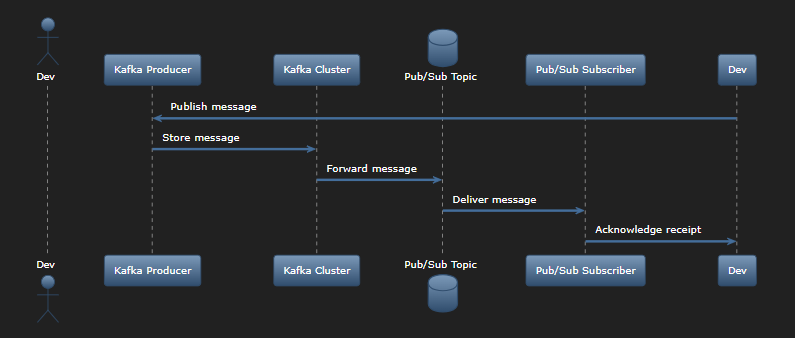
The sequence diagram below follows one message from a publisher through Kafka, into a Pub/Sub topic, and out to a subscriber that acknowledges it, which is the shape of a bridge between the two systems.
Choosing between Kafka and Pub/Sub
Pick Pub/Sub when you are already on Google Cloud, traffic is spiky, and nobody on the team wants to own a cluster. Pick Kafka when consumers need to replay history, when ordering across a partition is part of the design, or when the same events have to work outside one cloud. Neither is a delivery mechanism for events that leave your network: sending those to customer endpoints means signatures, retries, and per-endpoint rate limits, which is what event-driven architecture looks like at the boundary and what [Svix]https://www.svix.com/?utm_source=resources&utm_medium=content) handles.
Ready to send webhooks?
Svix handles signing, retries, rate limiting, and delivery observability for the webhooks you send to your users, so your team can stay focused on your product.
Start sending webhooks with Svix or read the build vs. buy analysis