What is a webhook and how does it work?
A webhook is an automated HTTP request that one system sends to another the moment an event occurs. Instead of your application repeatedly asking a service whether anything has changed, the service pushes a notification to a URL you provide as soon as something happens: a payment succeeds, a user signs up, a file finishes uploading.
To see why that matters, consider the alternative. You have two systems that need to talk to each other, and System A has data that System B cares about. With polling, System B asks System A “anything new?” every few seconds. This works, but it is wasteful. Most of the time, the answer is “no, nothing new,” and you have burned an API call for nothing. If you poll too frequently, you waste resources. If you poll too infrequently, you miss time-sensitive updates.
Webhooks flip this model around. Instead of System B constantly asking System A for updates, System A pushes updates to System B the moment something happens. System B provides a URL (the webhook endpoint), and System A sends an HTTP POST request to that URL whenever there is new data.
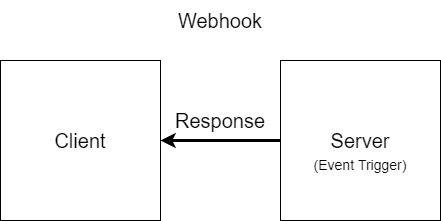
Webhooks vs. APIs
With a traditional API, communication starts with the client: your application sends a request to another system and waits for a response. Webhooks reverse that direction. The server sends the request, pushing data to you as soon as an event occurs, with nothing on your side needed to trigger it.
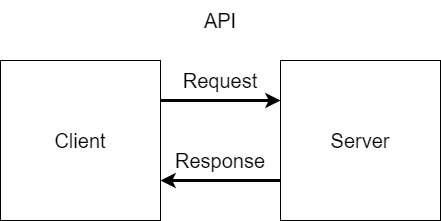
The two are complements, not competitors. Most integrations use both: an API for reading and writing data on demand, and webhooks for finding out when that data changes. For a side-by-side comparison, including where webhooks fall short, see webhook vs API.
How webhooks work in practice
When you integrate with a service that supports webhooks, you typically register an endpoint URL with that service. This is your callback URL, sometimes called the webhook URL, the place where you want to receive notifications. When an event occurs (a payment succeeds, a user signs up, a file is uploaded), the service constructs an HTTP request containing information about that event and sends it to your endpoint.
Your server receives this request like any other incoming HTTP request. You parse the payload, validate that it actually came from the expected sender, and then do whatever your application needs to do with that information. Finally, you return a 200 OK response to acknowledge receipt.
The service on the other end typically expects a quick response. If your endpoint takes too long to respond, or returns an error status code, the sender treats the delivery as failed. What happens next depends on the sender, which is what the next section is about.
How does a webhook work, step by step?
A webhook works in five steps. You register an HTTPS URL with the sender. When an event occurs, the sender POSTs a JSON payload to that URL with an event ID, a timestamp, and an HMAC signature in the headers. Your server verifies the signature and returns a 2xx status within the sender’s timeout. If it returns a 5xx or times out, the sender retries with exponential backoff.
- Register. Give the provider a public HTTPS endpoint and pick the event types you want.
- Event. The provider queues the event so delivery never blocks its own request.
- Deliver. A worker sends an HTTP POST with a JSON body and
webhook-id,webhook-timestamp, andwebhook-signatureheaders. - Verify and respond. Your endpoint checks the signature, returns 2xx within 5 to 30 seconds, and processes the event asynchronously.
- Retry. On a 5xx or timeout, the provider retries with backoff over 24 to 72 hours, then dead-letters the event.
The anatomy of a webhook request
A webhook request is just an HTTP POST with a JSON body, though some services use other formats. The request usually includes several important pieces of information.
The payload contains the actual event data. This might be the full details of the object that changed, or it might be a minimal notification that something happened (requiring you to fetch details separately). The choice between “fat” and “thin” payloads is a design decision with tradeoffs we will cover in a later article.
Headers often carry metadata like the event type, a signature for verification, and a timestamp. Providers following the Standard Webhooks spec standardize these as the webhook-id, webhook-timestamp, and webhook-signature headers. The signature is critical for security since it lets you confirm the request actually came from the expected sender and was not spoofed by an attacker.
An event ID or delivery ID identifies the event independently of any single delivery attempt, which matters because the same event can be delivered more than once, as covered below.
How webhook delivery works under the hood
On the sender’s side, delivery is almost never part of the original transaction. When the event occurs, the application writes it to a queue and moves on; a separate worker picks it up, builds the signed HTTP request, and handles delivery. This decoupling matters because delivery can be slow or fail outright, and neither should block the application that generated the event.
The request then makes an ordinary network journey: DNS resolution to find your server, a TCP connection, and a TLS handshake before the POST is sent. Each step can fail in its own way: DNS errors after you change an endpoint URL, connection failures when your server is down or unreachable, TLS failures when a certificate expires. The sender wraps the whole attempt in a timeout, typically between 5 and 30 seconds, and treats anything slower as a failure.
Your response status code tells the sender what to do next. A 2xx means delivery succeeded. A 4xx means something is wrong with the request itself, an invalid signature or a malformed payload, and most senders will not retry it because retrying will not fix it. A 5xx or a timeout means a temporary failure on your side, which is what triggers the retry machinery described next.
Delivery guarantees, duplicates, and ordering
Webhook delivery is best-effort unless the sender says otherwise. A well-designed provider retries failed deliveries with exponential backoff: a typical schedule attempts delivery after 5 minutes, then 30 minutes, then a few hours, spreading attempts over 24 to 72 hours before giving up. That upgrades the guarantee to at-least-once. Deliveries that exhaust their retries should land in a dead letter queue for manual replay rather than disappearing silently. Our retry best practices guide covers what a good retry schedule looks like.
At-least-once delivery has a flip side: the same event can arrive more than once. A retry can fire even though your endpoint actually processed the original request (for example, if it timed out while responding). Receivers handle this by treating processing as idempotent, typically by recording the event ID of each processed webhook and skipping any ID they have already seen.
Ordering is not guaranteed either. Retries and parallel delivery mean event B can arrive before event A even when A happened first, so rely on timestamps or sequence information in the payload rather than arrival order.
Retries also pile up during an outage. When your endpoint comes back online after being down for a few hours, the queued retries can arrive as a burst, so do not make the sender wait on slow processing: acknowledge each request immediately and do the real work asynchronously on a background queue. Our receiving best practices guide walks through this pattern.
When webhooks are the right choice
Webhooks excel when you need to react to events in near real-time but do not need to maintain a persistent connection. They are ideal for integrating with third-party services where you want to know immediately when something happens but you do not control the other system. This push-based model is the simplest way to adopt event-driven architecture without running your own event broker.
Common use cases include payment notifications (Stripe telling you a charge succeeded), version control events (GitHub notifying you of a push), communication triggers (Twilio alerting you to an incoming SMS), and e-commerce updates (Shopify informing you of a new order).
Webhooks also make sense when events are relatively infrequent. If you are dealing with thousands of events per second, you might want to consider a message queue or streaming solution instead. But for the typical case of occasional events that need prompt handling, webhooks are simple and effective.
When webhooks are not the right choice
Webhooks require your server to be reachable from the internet. If you are behind a firewall without a public endpoint, receiving webhooks becomes complicated (though tools like ngrok can help during development, and our webhook testing guide covers other workarounds).
Delivery is also only as reliable as the sender makes it. If your endpoint is down and the sender does not retry, the event is simply lost, so a provider without a serious retry policy pushes reliability work onto you.
For high-frequency, bidirectional communication, WebSockets or Server-Sent Events are better choices. Webhooks are fundamentally a push-and-forget mechanism. Each request is independent, with no persistent connection between sender and receiver.
Finally, if the sender does not support webhooks, you are back to polling. Not every API offers webhook functionality, though it has become increasingly common.
Are webhooks secure?
Because a webhook endpoint is a publicly reachable URL, anyone could send a request to it. Receivers therefore need a way to verify that an incoming request genuinely came from the expected sender. The standard approach is webhook authentication using signatures: the sender signs each payload with an HMAC secret, and the receiver recomputes and checks that signature before trusting the request. Signing the timestamp along with the raw body also defends against replay attacks, where an attacker captures a valid webhook and resends it later: the stale timestamp gives it away. Senders should also deliver webhooks exclusively over HTTPS. For a practical checklist, see our webhook security best practices.
Getting started
To receive webhooks, you need three things: an HTTP endpoint that can accept POST requests, logic to parse and validate incoming payloads, and a way to acknowledge receipt with an appropriate status code.
A production-ready receiver needs a bit more care. Verify the signature on every request before trusting it. Respond quickly and do the real work asynchronously, so the sender does not time out and retry. And handle duplicate deliveries, since retries mean the same event can arrive more than once. Our first webhook endpoint tutorial walks through building one.
If you would rather not build and operate that infrastructure yourself, Svix Ingest is a managed gateway for receiving webhooks. It verifies signatures from popular providers like Stripe, GitHub, and Shopify out of the box, absorbs traffic spikes with configurable throttling, retries failed deliveries into your systems, and can filter, transform, and fan out events to multiple destinations.
In the following articles, we will build webhook receivers from scratch, compare webhooks to alternative approaches in depth, and dive into the security considerations that every webhook implementation needs to address.
Frequently asked questions
What is a webhook in simple terms?
A webhook is a message one system automatically sends to another over HTTP when something happens. You give a service a URL, and it sends a POST request to that URL whenever an event you care about occurs, so you find out immediately instead of having to ask.
Is a webhook the same as an API?
No. An API is pull-based: your application requests data when it wants it. A webhook is push-based: the other system sends data to you when an event occurs. Most integrations use both together, an API for on-demand reads and writes, and webhooks for change notifications.
Do webhooks guarantee delivery?
Not by default. If your endpoint is down when the sender delivers and the sender does not retry, the event is lost. Providers that take reliability seriously retry failed deliveries with exponential backoff and route deliveries that exhaust their retries to a dead letter queue for replay.
Why Svix?
Building a reliable webhook system yourself means handling unreliable receiver endpoints, retries and monitoring, and the security concerns unique to webhooks. Svix is an open source webhooks-as-a-service platform that takes care of all of it, so you can start sending webhooks in minutes. It offers a REST API and a set of open source libraries, and it also helps your users securely verify and consume the webhooks they receive from you. If you have questions or just want to chat, join the Svix Slack community.