Stripe Webhooks Review
Stripe's webhooks meet all seven criteria we use to judge a webhook implementation. Events are signed with HMAC-SHA256 in a Stripe-Signature header, live-mode deliveries retry for up to three days with exponential backoff, failing endpoints are disabled after three days, and the Dashboard shows every delivery attempt and response.
Stripe is a financial services platform and payment infrastructure for the internet. We took a look to see how they’ve designed their offering and how they’ve documented it. When we look at webhook solutions, we’re generally looking for 7 things:
- Signature verification
- Retries
- Exponential backoff
- Manual retries
- Visibility into logs
- Event types
- Multiple endpoint support
The sections below cover how Stripe handles each one.
Signature verification
Signature verification is a security feature of webhooks. It lets users verify that a webhook was actually sent from the expected source. Our reference point for it is the Standard Webhooks specification, which defines the standard headers and signing scheme; Stripe's scheme predates the specification and uses its own header format.
Stripe allows signature verification to ensure the events are not sent by a third party. The events Stripe sends to webhook endpoints can be verified by signatures either using official libraries or manually. The signatures are optionally added in each event’s Stripe-Signature header. A secret key is generated for each endpoint and each webhook sent to the endpoint signed by Stripe Verification through the official library is done using the event payload, the Stripe-Signature header, and the endpoint’s secret. Manual verification requires a Stripe-Signature header with timestamp t and a scheme v followed by an integer. Stripe generates signatures using a hash-based message authentication code (HMAC) with SHA-256.

Retries
Stripe has separate retry schedules based on whether you're in live or test mode (clever!). After 3 days of an endpoint failing, Stripe will disable your endpoint and send you a notification.
Exponential backoff
Exponential backoff is an algorithm that increases the delay between retries exponentially. This ensures that your system won’t get bottlenecked from having to re-queue failed webhooks while also giving users time to fix broken endpoints before they burn through all their retry attempts.
Stripe has implemented certain rate limits to ensure stability and smooth working for both live and test modes. In live mode, Stripe retries for up to three days with an exponential back off whereas, in test mode, it makes three attempts to deliver over a few hours. In case of a disabled or deleted endpoint, further retries of an event to that endpoint are prevented.
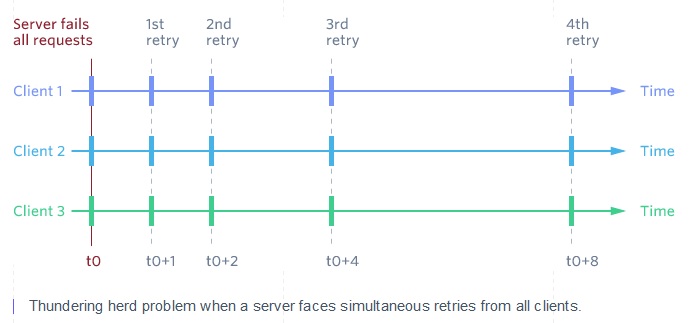
Webhooks retries can also be adjusted manually from the Dashboard. Stripe suggests following an exponential backoff schedule in the case of 429s but cautions to add some randomness into the backoff schedule to avoid a thundering herd effect. Apart from exponential backoffs, a misconfigured endpoint is also communicated via email if it has not responded with a 2xx HTTP status code for multiple days in a row.
Manual retries
In the event that a user’s endpoint is failing, its nice to give the developer tasked with debugging the endpoint, the option to initiate a retry manually instead of having to wait for the next scheduled retry (this could be several hours of waiting if they’re close to the end of the retry schedule).
Stripe lets you manually retry webhooks from the Dashboard, but only in test mode and only after the three test-mode retries have been used up.
Visibility into logs
The Stripe Dashboard lets you view delivery attempts, event logs, and the retry logic of your webhook events. You can look at a specific webhook and see how many times a retry has been attempted, and how your endpoint responded.
Event types
Event types are identifiers denoting the type of message being sent and are the primary way for webhook consumers to configure what events they are interested in receiving.
When something happens in the user’s account or the state of an API resource changes, Stripe creates an Event object to describe it. For instance, if a payment attempt fails, an invoice.payment_failed event is created. Multiple events are created for certain API requests like a new subscription for a customer will lead to a customer.subscription.created event, and a charge.succeeded event. The Event objects are directly sent to an endpoint by a webhooks system. A complete list of types of events is provided here: Event Types.
Multiple endpoint support
Many webhook solutions only allow one endpoint URL to be specified where all messages will be received. By enabling your users to create multiple endpoints, they’ll be able to choose which endpoints receive which messages. Multiple endpoint support and event types go hand in hand.
Endpoint directs Stripe where to deliver an event. Up to 16 webhook endpoints can be registered with Stripe. Currently, Stripe supports two types of endpoints, Account and Connect but a clear mention of multiple endpoint support is not found. According to a user, multiple webhook endpoints are supported for a Stripe Account but the support is limited to a single endpoint for Stripe Connect.
What Stripe gets right, and what to watch
Stripe's docs are thorough, and the implementation covers every feature that contributes to a good developer experience: signed payloads, a published retry schedule, manual replay, and a delivery log you can read per event. The one gap is clarity on endpoint support, specifically whether the multiple-endpoint limit applies to Connect the same way it applies to a standard account.
If you’re looking to implement webhooks at Stripe's level, [Svix]https://www.svix.com/?utm_source=resources&utm_medium=content) provides the same webhook infrastructure as a service: signature verification, a retry schedule with exponential backoff, and per-endpoint delivery history behind an API.
Need to receive webhooks reliably?
Svix Ingest gives you one endpoint for webhooks from any provider, with signature verification and durability built in, so a redeploy or a traffic spike never drops an event.
Start receiving webhooks with Svix Ingest or inspect webhooks with Svix Play